Introducing Ask Hortis: Chat with your plant collection


Every garden has a list of questions it never quite gets around to answering.
Which accessions of wild origin lack detailed provenance information? Which plants haven't had a condition check since spring? How many of our threatened taxa are represented by a single plant?
None of these are difficult questions, they just take a bit of time to figure out and in most gardens, time is not in abundance. This is where Ask Hortis can help you.
What the AI connector actually is
Hortis now allows you to connect directly to AI assistants like Claude and ChatGPT.
Once you're connected, the assistant can look things up in your collection, and, with your say-so, create and update records. It works with your Hortis login, sees only what your account can see, and works on live data rather than a static export of your collection.
With your favourite AI account active, Ask Hortis is connected with a few clicks, and then you can ask your questions in plain language and get the answers derived directly from your own collection records.
The technical name for the standard that Ask Hortis is built on is called Model Context Protocol (MCP). This is an open standard, which allows the connector to work with the assistant your garden is already using and will keep working with whatever you move to next.
From question to answer
Question:
Which of our accessions are recorded as wild-collected, and how many have living material right now?
The assistant queries your accessions and plant material, and gives you the count with the breakdown.
Follow-up question:
Of those, which are represented by only one living plant?
Now you have your single-specimen risk list.
One step further:
For those, tell me which locations they're in and when each was last observed.
Locations and condition logs are pulled together in one answer.
Create a list:
Tag those accessions as 'propagation priority' and add a note to each asking the nursery team to review.
Now you have a list for your horticulture team to work on.
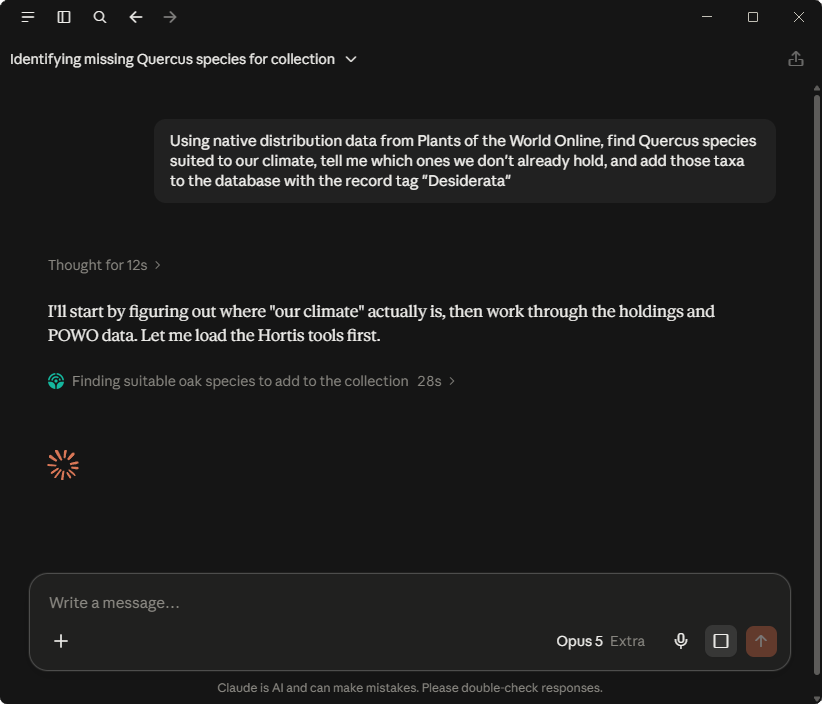
Ask Hortis makes a wide range of tasks simpler
Analyse and summarise
Answer questions that would otherwise mean combining several filters or working in a spreadsheet: counts, breakdowns, comparisons and lists drawn from any part of your collection data.
List all the trees in our collection with a native distribution in the Southern Hemisphere.
Audit and correct
Find records that don't look right, then fix them together rather than one by one. Adding a record tag as part of the request gives you a list of everything that was changed.
Find all plant material whose mapped position falls outside the boundary of the location it is assigned to. Update these with the correct location and add the record tag "Location updated”.
Cross-reference and enrich
Compare your holdings against external botanical sources, and bring what's missing into your database.
Using native distribution data from Plants of the World Online, find Quercus species suited to our climate, tell me which ones we don't already hold, and add those taxa to the database with the record tag "Desiderata".
Record and update
Capture work in the field or on the nursery bench across many records at once — condition observations, treatment notes, or any other log entry.
Add a log note to every rose in Bed A4 with the text "Given fish, blood and bone meal", dated 10 February.
Produce outputs
Turn a question into something you can circulate: a written summary, a table, or a list.
Write a report covering all plant material added to and removed from the collection during August.
How it works, and where the limits are
The assistant works on your behalf. If your account can't see a site, neither can it.
It reads, writes and archives - nothing gets deleted. The connector can create and update accessions, plant material, taxa, locations, sources, logs and tags. You can also archive records, which can later be restored if needed. Nothing gets deleted.
Changes show up in Hortis like any other edit. Anything the assistant creates or updates appears in your record history and team activity, attributed to your account. You can see what happened and undo it the normal way.
Names are still validated. New taxa are checked against Hortis Shared Taxonomy, so your data standards hold.
You stay the curator. The assistant is fast and may sometimes give incorrect answers. Make sure you check all answers before sharing or acting on the result.
What this means for your team
Records officers can spend more time coordinating and getting the data-entry backlog moving.
Curators can quickly run the kind of analysis that used to take days. Cross-referencing your collection against an external dataset only needs a question.
Horticulturists can prepare weekly reports on their activities and plan next week's work based on observation metrics.
Directors and trustees can get collection figures in minutes.
Getting started
Full setup instructions are available in this support article. The connector is now available on all subscription plans, and even on our free trial.
What you told us at the Ask Hortis webinar
People have mixed feelings about AI, with concerns about energy use, data privacy, the effect on jobs, and accuracy. Those feelings are part of the context we're launching Ask Hortis into, so we put two polls to the audience at our launch webinar to see where they stood.
"How do you expect AI to affect your work over the next few years?"
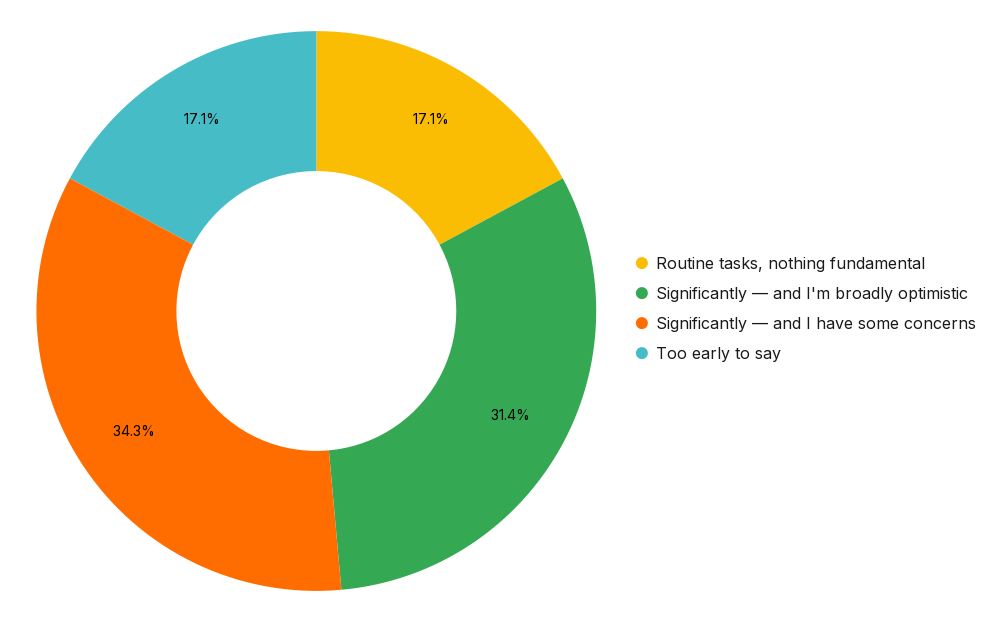
Two things stand out. Not one person expected no impact at all. And of the two-thirds who expect significant change, slightly more have concerns than are optimistic.
That split is the honest state of things, and we don't think it's a problem to be argued away. Concerns about accuracy, provenance, what happens to hard-won expertise, and who is accountable when a record is wrong are all reasonable concerns to hold when it comes to a tool that touches collection data. As this is the first release, we cannot yet be sure that we've got the balance right, so tell us what works, what doesn't, and where you'd like us to place some guardrails. We can't address every concern, but we will take action where we can.
"Have you used AI tools like ChatGPT, Claude or Copilot for any of these?"
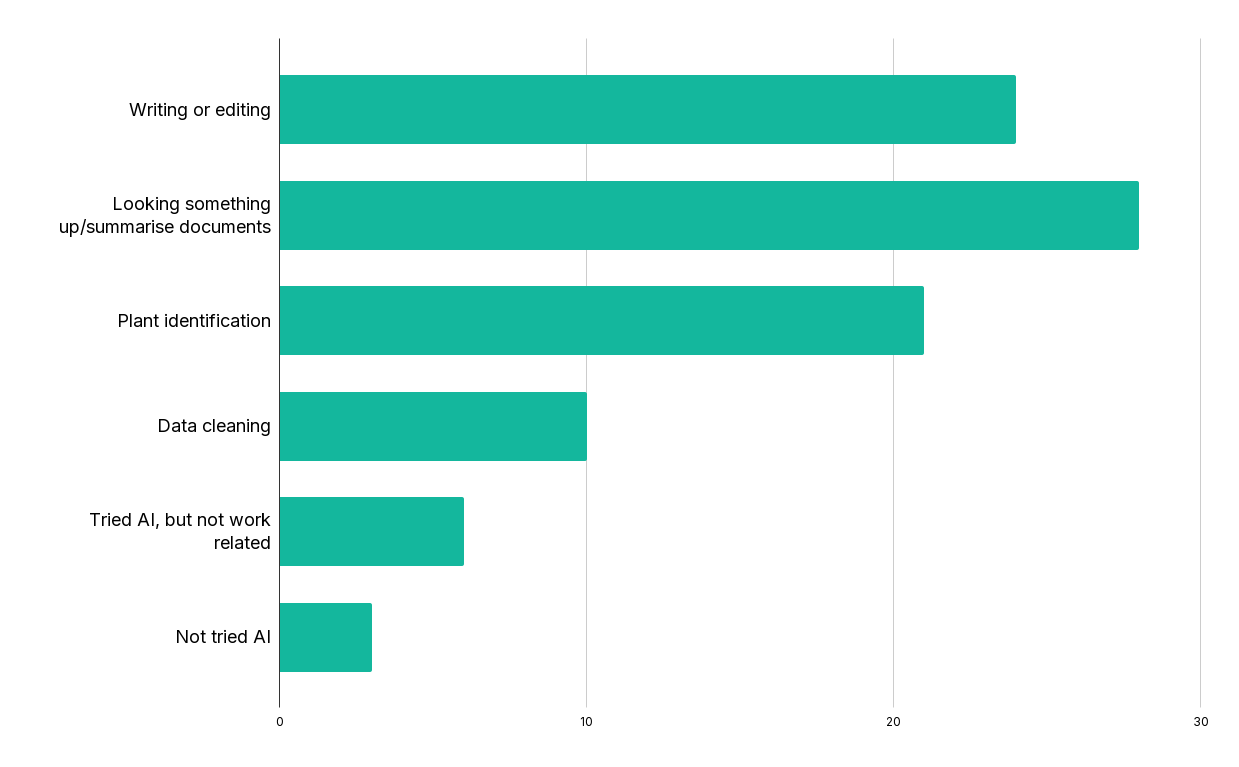
All but three people attending our launch webinars had already used AI tools.
It was interesting to see that data cleaning was the least used tool, which we feel is a very important part of collection management. This is likely to be related to the complex workflow that is involved in having to export the data, work on a copy within the AI tools and upload the cleaned data back into your system. With Ask Hortis, this is now a simple task.
Watch the webinar
The full session, including the demo, is available below. Many of the questions raised during the webinar Q&A can be found here: Ask Hortis FAQ.